


On-Device AI: The 2026 Gadget Revolution | Tech-Knowledge

Updated: Jul 31
What is On-Device (Edge) AI—in plain English?
“Edge AI” (also known as on-device AI) runs AI models right where the data is created—on your phone, watch, car, or a sensor. This approach avoids sending everything to distant servers. The result is lower latency, better privacy, reduced bandwidth usage, and higher reliability. It works even with poor or no signal.
If the cloud is a library across town, on-device AI is a desk copy at home. You get answers faster, and you don’t expose your diary on the bus ride.
The smartest gadget of 2026 won’t be the one with the most features. Instead, it will be the one that understands you locally, keeps your data on your device when possible, and only calls home when necessary. That’s the quiet revolution of on-device AI.

Why 2026 is the Tipping Point
The Power of Local Processing
Smartphone chips with powerful NPUs are designed to run AI locally. This enables features like instant translations and real-time photo enhancements without needing to connect to the cloud. Analysts predict that “nextgen AI smartphones” (with ≥30 TOPS NPU) will see rapid growth through 2028.
Leading Platforms
Qualcomm’s latest platforms for both phones and Windows laptops showcase high TOPS NPUs. These chips can efficiently run multiple AI tasks directly on the device.
Apple’s approach combines on-device models with a privacy-focused “Private Cloud Compute” system. This ensures that personal context remains on your device by default.
Google’s Gemini Nano introduces on-device summarising, rewriting, and accessibility features to modern Android phones. These features operate offline and maintain user privacy.
The Big Benefits (You Will Actually Feel)
Speed You Can Feel: Voice, camera, and text features respond instantly because there’s no internet hop.
Privacy by Default: Sensitive content, like photos and health data, can be processed locally without leaving your device.
Reliability & Offline Use: Features still work on a plane, on the Tube, or in a dead spot.
Battery & Efficiency: Purpose-built NPUs are more power-efficient for AI tasks than traditional CPUs or GPUs.
Everyday Examples (Consumer Electronics)
Camera Magic on the Phone
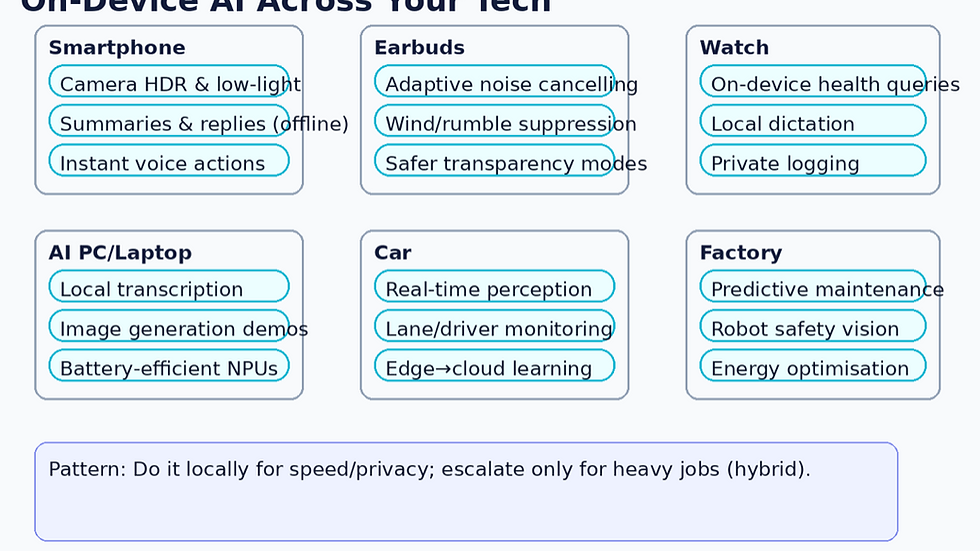
New mobile chips run computational photography in real-time. This results in cleaner low-light images, better HDR, and steadier video.
Android’s Gemini Nano
On-device summarising in Recorder, smart replies, and multimodal descriptions are available offline on supported Pixels and newer Android devices.
Industry Momentum
IDC tracks a surge in “AI smartphones” capable of on-device GenAI, not just cloud-assisted features.
Example: Where the AI Runs on a Phone (Simplified)
[Camera/Mic/Sensors] → [NPU on Phone] → Result Now
(Only if too big) → [Private/Cloud AI] → Result Later
Local first; escalate to the cloud only for heavier tasks—what Apple and Google both describe in their hybrid designs.
Adaptive ANC
Adaptive Active Noise Cancellation (ANC) now uses AI to predict and cancel changing background sounds. This improves comfort and focus in environments like cafes or busy streets. [zdnet.com]
Reviews show that the latest Sony WF1000XM6 and Bose QC Ultra deliver stronger, more “intuitive” ANC—powered by on-device processing in the earbuds themselves.
Example: Noise Profile Adjustment
When the train enters a tunnel, the earbuds’ microphones and on-bud AI relearn the noise profile in milliseconds and adjust—without your phone or the cloud.
On-Device Siri
On newer Apple Watch models, on-device Siri can log medications, check sleep data, or monitor heart rate trends without sending data out, thanks to a new neural engine.
Example: “Hey Siri, log 5mg medication at 8pm.” It’s saved locally and synced securely—fast and private.
Windows Laptops with Snapdragon X Elite
Windows laptops equipped with Snapdragon X Elite feature a 45 TOPS NPU. This allows apps like transcription, background blur, and even image generation to run directly on the machine—saving time and battery.
Microsoft’s Copilot+ PC guidance highlights local AI features that rely on NPUs with ≥40 TOPS, indicating where everyday Windows features are headed.
Why Engineers Love It (and Why You’ll Care)
Engineers can tailor gadgets to your actual habits. They can learn when you usually commute, the lighting conditions for your photos, or the types of noise you encounter. Running models locally allows devices to adapt over time while keeping your personal data secure.
The Ripple Effects Beyond Consumer Tech
Automotive Innovations
Modern driver assistance and autonomy systems rely on in-vehicle computing, such as NVIDIA DRIVE Orin/AGX. These systems fuse camera, radar, and lidar data in real time—you can’t wait on the cloud for critical actions like braking.
New “edge to cloud” car platforms dynamically split tasks. Safety-critical decisions stay onboard, while fleet learning and heavy analytics are sent to the cloud.
Rail Industry Transformation
The rail industry is moving from periodic checks to AI-enabled predictive maintenance. This increasingly involves edge nodes on trains and tracks for low-latency alerts.
Case studies show edge AI sensors catching bearing and wheel issues early. This cuts downtime and improves safety by making decisions locally—vital in tunnels or remote lines.
Industrial Applications
Industrial reviews indicate that moving diagnostics to the edge reduces latency and privacy risks while improving uptime. This is especially important for predictive maintenance in the Industrial Internet of Things (IIoT). Frameworks that combine edge devices + AI can estimate remaining useful life and detect early faults without overwhelming the cloud—leading to lower bandwidth usage and faster action.
Challenges & Open Questions
Model Size vs Device Limits
Tiny models run quickly, but complex tasks may still require a hybrid approach. This means local processing first, with the cloud used only when necessary (local first, cloud when needed).
Transparency & Control
Users should know what is learned locally and have simple controls to reset or opt out. This is a hot topic in regulated sectors like transport.
Ecosystem Support
Developers need stable APIs and tools, such as Android AICore and Windows NPU APIs. This ensures that features remain functional across updates and devices.
How to Spot an “On-Device Ready” Gadget When You Shop
Look for an NPU (or “Neural Engine”) specification and the percentage of features that can run offline.
Hybrid privacy messaging (e.g., Apple’s Private Cloud Compute) should clearly explain when data might leave your device.
Developer-backed features—like Gemini Nano on Android or Copilot+ on Windows—usually indicate better long-term support.
FAQ:
Generally, yes. Local processing reduces what leaves your device. Hybrid designs only send what’s necessary, with added safeguards. Always check each vendor’s policy.
NPUs are designed to use less power than CPUs/GPUs for AI tasks, making many features more efficient.
Not quite. The best systems are hybrid: quick tasks are handled on-device, while heavy lifting occurs in the cloud (with privacy controls).


I started using Atomic Chat for a rather unusual reason: I wanted to see how useful AI would be during a period when I intentionally wasn't connected to the internet. I had a long train journey ahead of me and downloaded a local model before leaving. During the trip, I used the application to organize personal notes, rewrite several pieces of text and generate ideas for a project I had been postponing. The experience was different from my usual use of online assistants because there was no need to wait for a connection or worry about losing access halfway through a conversation. Once the model was installed, I could simply open Atomic Chat https://atomic.chat/ and continue working. I also tried…
Photography has always been a way to capture personal moments, but artificial intelligence is creating new opportunities for transforming ordinary portraits into more creative digital images. AI selfie generators represent a new approach to visual creation by allowing users to explore different styles, concepts, and appearances through automated processing. These technologies analyze image details and help produce customized results based on modern AI algorithms. More information about this type of solution can be found here: https://overchat.ai/image/ai-selfie-generator. Such tools can be useful for people who create online content, update profile images, or simply want to experiment with different visual ideas. Unlike traditional editing methods, AI-powered platforms reduce the need for complex manual adjustments and provide a faster way to explore creative…
https://xosoplus.mobi/xsdno-xo-so-dac-nong-cr81.html hôm bữa lướt thấy link này nên vào xem thử cho biết, kiểu tò mò giao diện họ làm ra sao thôi. Vừa mở lên là thấy mục XSDNO chia theo ngày nhìn khá dễ, mình nhìn cái “18/07/2026” là nhận ra ngay chứ không phải kéo tìm mệt. Phần mình ưng là bảng kết quả để theo từng giải, trình bày gọn nên liếc nhanh vẫn nắm được số nào ra. Kéo xuống dưới chút còn có khung thống kê lô tô kiểu đầu/đuôi xếp thành từng block nên mắt không bị loạn. Nói chung bố cục trang này làm mình thấy dễ theo dõi, nhất là cái bảng kết quả theo giải nằm ngay phía trên khung…
https://keonhacai55.lol/ hôm trước thấy mấy đứa bạn share nên mình bấm vào coi thử cho biết, kiểu chỉ ngó giao diện thôi chứ không ngồi đọc kỹ hay làm gì hết. Ấn tượng đầu là trang nhìn khá dễ thở, không bị rối mắt như nhiều chỗ khác. Mấy phần nội dung được chia thành từng khối rõ ràng nên lướt một vòng là hiểu mình đang ở đâu, cần tìm gì. Mình cũng để ý cái menu đặt khá nổi, chuyển qua lại giữa các mục nhanh, không phải kéo lên kéo xuống nhiều. Nói chung cảm giác dùng thử vài phút thấy ổn, nhất là cách họ trình bày theo khối và mấy bảng thông tin dạng cột…
https://keonhacai.cam/ mình ghé thử vì thấy bạn bè nói qua, kiểu vào xem giao diện cho biết thôi chứ không có thời gian đọc kỹ. Vừa mở lên thấy bố cục khá “dễ thở”, các phần được chia thành từng khối nhìn phát hiểu ngay đang ở đâu, không bị dồn chữ tùm lum. Mình để ý mấy chỗ dạng bảng/cột trình bày gọn, lướt nhanh vẫn bắt được ý chính mà không phải căng mắt. Thanh menu cũng nằm chỗ dễ thấy nên bấm qua lại vài mục khá mượt, không phải kéo lên kéo xuống tìm. Nói chung cảm giác giống như họ sắp xếp mọi thứ theo kiểu ưu tiên nhìn nhanh là hiểu, nhất là mấy…